
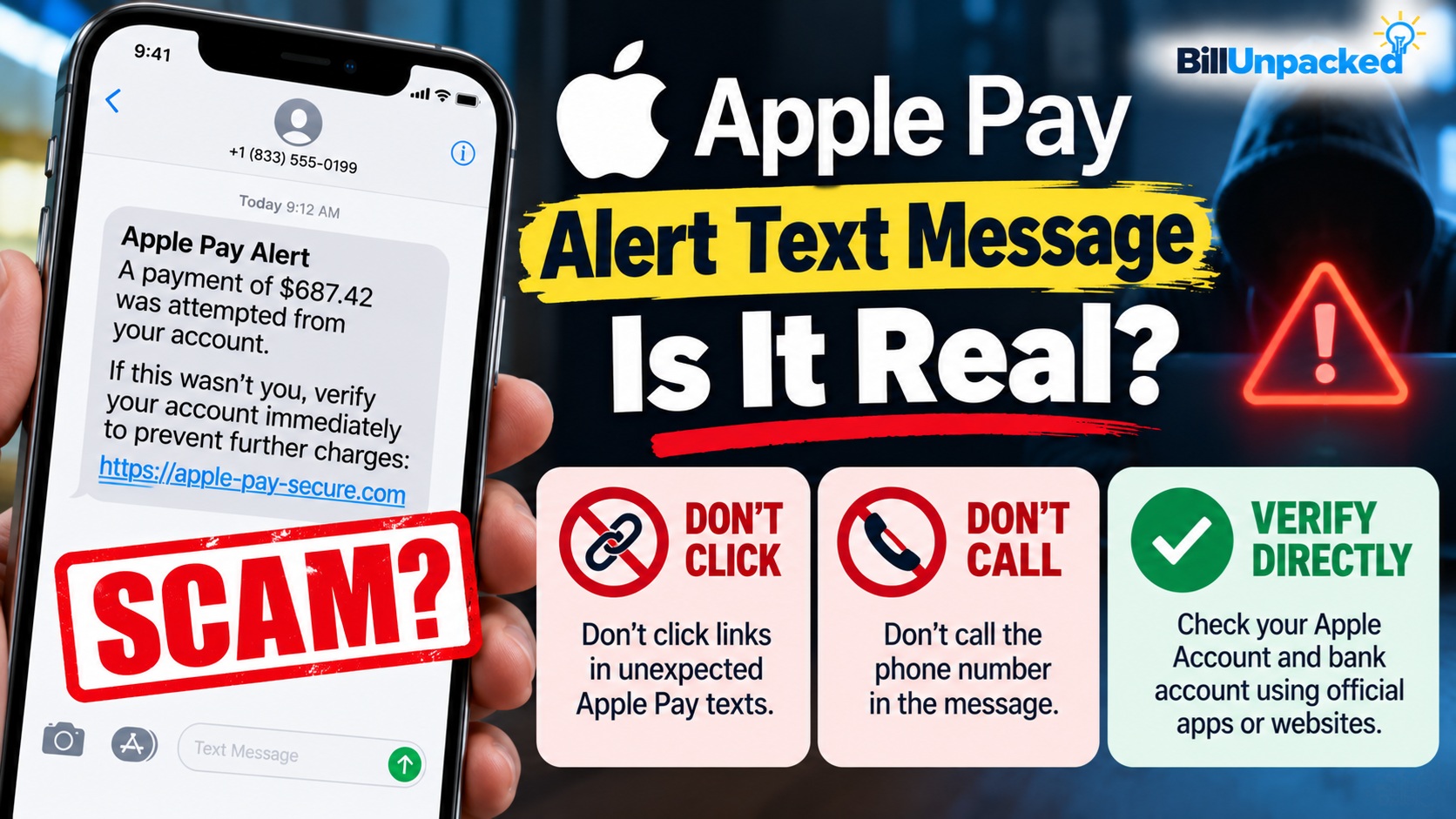
Apple Pay Alert Scam Text Message: Is It Real?
An unexpected Apple Pay alert text message claiming there was a suspicious purchase, unauthorized payment or security problem may be a phishing scam. Do not click its link, call a phone number contained in the message, reply to it, or provide your Apple Account password or verification code. Instead, check your actual Apple devices and financial accounts independently. Apple warns that scammers specifically impersonate Apple and may claim there are unauthorized Apple Pay charges to pressure victims into acting quickly.
❌ Don’t click the link.
❌ Don’t call the number in the text.
❌ Don’t reply to the message.
❌ Don’t share an Apple Account password.
❌ Never give someone your Apple verification code.
Verify the supposed problem independently.
Is the Apple Pay Alert Text Message a Scam?
It could be.
Scammers send convincing text messages pretending to represent Apple, banks and other trusted companies.
Apple’s current security guidance specifically warns that scammers may claim someone has broken into your Apple Account or made unauthorized charges using Apple Pay.
The scammer may then claim they can help stop the attacker or reverse the charges.
The goal is often to create enough fear and urgency that you follow instructions without independently checking whether anything actually happened.
What Does an Apple Pay Scam Text Look Like?
There isn’t one universal Apple Pay scam message. The wording changes frequently.
A fraudulent message might claim:
“Apple Pay Alert: A payment of $687.42 was attempted from your account. If this wasn’t you, verify your account immediately.”
Another variation could claim:
“Security Alert: Your Apple Pay account has been temporarily restricted due to suspicious activity. Confirm your information to restore access.”
The precise amount, phone number, web address and wording can vary. Scammers frequently change them to evade filtering and appear convincing.
How Can I Tell If an Apple Pay Alert Is Fake?
Apple identifies several warning signs associated with fraudulent messages.
| Warning Sign | Why It’s Suspicious |
|---|---|
| Unexpected security warning | Scammers commonly invent urgent account problems or unauthorized charges. |
| Message tells you to click a link | The link may lead to a phishing site designed to steal information. |
| Asks for your Apple Account password | Apple says never to share your Apple Account password. |
| Asks for a verification/security code | Apple says never to share verification codes with anyone. |
| Demands immediate action | Creating urgency is a common social-engineering tactic. |
| Sender information looks wrong | Apple says mismatched sender information can indicate phishing. |
| URL doesn’t match the claimed company | Look-alike domains can lead to fake login pages. |
| Requests card or personal information | Unexpected requests for sensitive information are a major warning sign. |
What Should I Do With an Apple Pay Alert Text?
If you weren’t expecting the message, don’t interact with it.
Avoid opening links contained in unexpected Apple Pay security texts.
Don’t respond with YES, NO, STOP or other information simply because the message tells you to.
A callback number may connect you directly with the scammer.
Open the relevant Apple or banking service yourself instead of using the message’s link.
Use available spam/junk reporting tools after preserving anything you need for a fraud report.
How Do I Check Whether the Apple Pay Transaction Is Real?
Don’t use the link or phone number contained in the suspicious text.
Instead, independently check the card or account involved.
For example, review your transaction activity through your bank or card issuer’s official app or website.
If you’re concerned about your Apple Account, use Apple’s official account and support channels directly.
Suspicious text says there’s a $500 Apple Pay purchase?
Do not click the text.
Instead, independently open the relevant bank/card account and check whether the transaction actually exists.
Does Apple Send Security Alerts?
Apple can provide legitimate notifications about account activity. That fact alone does not make every message claiming to be from Apple genuine.
Apple lists examples of possible signs that an Apple Account has been compromised, including:
- A notification or email about account activity you don’t recognize.
- A sign-in on a device you don’t recognize.
- A password change you didn’t make.
- A two-factor authentication code you didn’t request.
- Trusted devices you don’t recognize.
- Purchase activity you don’t recognize.
The safest response to an unexpected warning is to investigate through Apple’s genuine services rather than following instructions in the unexpected message.
Will Apple Ask for My Verification Code?
Do not give an Apple Account verification code to someone who contacts you.
Apple explicitly says it never asks customers to provide their Apple Account password or verification codes in order to provide support.
A scammer may already know your email address, phone number or other personal details. Your verification code could be what they still need to access an account.
Can the Caller ID Really Say Apple?
Potentially—and that still doesn’t prove the call is genuine.
Apple warns that scammers can use Caller ID spoofing so that a phone call appears to come from Apple or another trusted company.
If a caller claims to be Apple and the situation seems suspicious, hang up and contact Apple independently through its official support channels.
What If the Text Knows My Name?
That doesn’t necessarily make it legitimate.
Apple warns that scammers can mention personal information in an attempt to build trust.
A scammer may know information such as your:
- Name
- Phone number
- Email address
- Home address
- Employer
Some information can come from data breaches, public records, social media or other sources.
Do not use the presence of personal details as proof that the sender really represents Apple.
What If I Already Clicked the Apple Pay Scam Link?
What you should do next depends on what happened after you clicked.
| What Happened? | What to Do |
|---|---|
| Clicked but entered nothing | Close the page. Don’t download anything or grant permissions. Keep your device/software updated and monitor for unusual activity. |
| Entered Apple Account password | Change your Apple Account password immediately and review account security. |
| Shared a verification code | Treat the account as potentially compromised and secure it immediately. |
| Entered card details | Contact the card issuer using the official number on your card or its official app/site. |
| Entered bank information | Contact your financial institution promptly. |
| Lost money or exposed identity information | Follow FTC/IdentityTheft.gov recovery guidance and contact the relevant financial institutions. |
What If I Entered My Apple Account Password?
Act immediately.
Apple says that if you believe your Apple Account has been compromised, or you entered your password or other personal information on a scam website, you should change your Apple Account password immediately.
Apple also recommends ensuring that two-factor authentication is enabled.
Review the devices associated with the account and remove any that you don’t recognize.
What If I Gave the Scammer My Card Number?
Contact the bank or card issuer directly using a trusted method, such as the number printed on the back of your card or the institution’s official app or website.
Tell the issuer that your card information may have been exposed in a phishing scam.
Follow the issuer’s instructions regarding locking or replacing the card and reviewing transactions.
What If I See an Apple Pay Charge I Don’t Recognize?
Separate the suspicious text from the actual financial transaction.
Even if the text itself is fraudulent, independently check whether an unrecognized transaction really exists.
If your bank or card account shows a transaction you didn’t authorize, contact the card issuer promptly through its official channels and follow its fraud-reporting procedure.
Do not rely on the person who sent the suspicious message to “reverse” the transaction.
What If I Received an Apple Verification Code I Didn’t Request?
Apple lists receiving an unexpected two-factor authentication code as one possible sign of account compromise.
Do not give the code to anyone.
If you also notice unfamiliar account activity, unknown devices or password changes, follow Apple’s account-compromise instructions immediately.
How Do I Report an Apple Pay Scam Text?
For suspicious messages claiming to be from Apple, follow Apple’s official reporting and security guidance.
For scam text messages generally, the Federal Trade Commission recommends using your phone’s Report Junk option where available or forwarding the unwanted text to:
The FTC also accepts scam reports through its official fraud-reporting service.
If a suspicious email is designed to look like it came from Apple, Apple says it can be forwarded to:
Common Apple Pay Scam Text Red Flags
| Message Says… | Safer Response |
|---|---|
| “Your Apple Pay account is locked.” | Don’t click. Check your account independently. |
| “$799 Apple Pay purchase detected.” | Check your card/bank activity directly. |
| “Reply NO if this wasn’t you.” | Don’t automatically reply to an unexpected message. |
| “Call immediately to stop payment.” | Don’t use the message’s number. Contact the relevant company independently. |
| “Verify your Apple Account now.” | Don’t use the link. Access Apple services yourself. |
| “Tell us the verification code we just sent.” | Never provide the code. |
Quick Answers
| Question | Answer |
|---|---|
| Are Apple Pay alert texts scams? | Some are. Scammers impersonate Apple and may claim there are unauthorized Apple Pay charges. |
| Should I click the link? | No. Verify the supposed issue independently. |
| Should I reply NO? | Don’t automatically respond to an unexpected suspicious message. |
| Should I call the number in the text? | No. Contact Apple or your financial institution through a trusted official channel. |
| Will Apple ask for my verification code? | Apple says it never asks for your Apple Account password or verification codes to provide support. |
| What if I entered my Apple password? | Change your Apple Account password immediately and review account security. |
| What if I gave away card information? | Contact the card issuer promptly through its official number/app/site. |
| How can I report a scam text? | Use Report Junk where available or forward it to 7726 (SPAM), and report fraud to the FTC. |
Bottom Line
If you receive an Apple Pay alert scam text message claiming there’s an unauthorized purchase or security problem, don’t panic and don’t follow the message’s instructions.
Apple confirms that scammers use exactly this type of story—including claims of unauthorized Apple Pay charges—to create urgency.
Don’t click the link, don’t call the included number, don’t reply, and never provide an Apple Account password or verification code.
Instead, independently check your Apple Account and the bank or card connected to Apple Pay.
If you already disclosed credentials or financial information, secure the affected accounts immediately and contact the appropriate financial institution through a trusted official channel.
Official Sources
Apple Support — Recognize and Avoid Social Engineering
Apple’s Official Scam and Phishing Guidance
Apple Support — Compromised Apple Account
What to Do If Your Apple Account May Be Compromised
Federal Trade Commission
How to Recognize and Avoid Phishing Scams
Last reviewed: October 6, 2026. Scam messages change frequently. BillUnpacked is an independent informational website and is not affiliated with Apple. Never use an unexpected message itself as your only source for verifying account activity.