
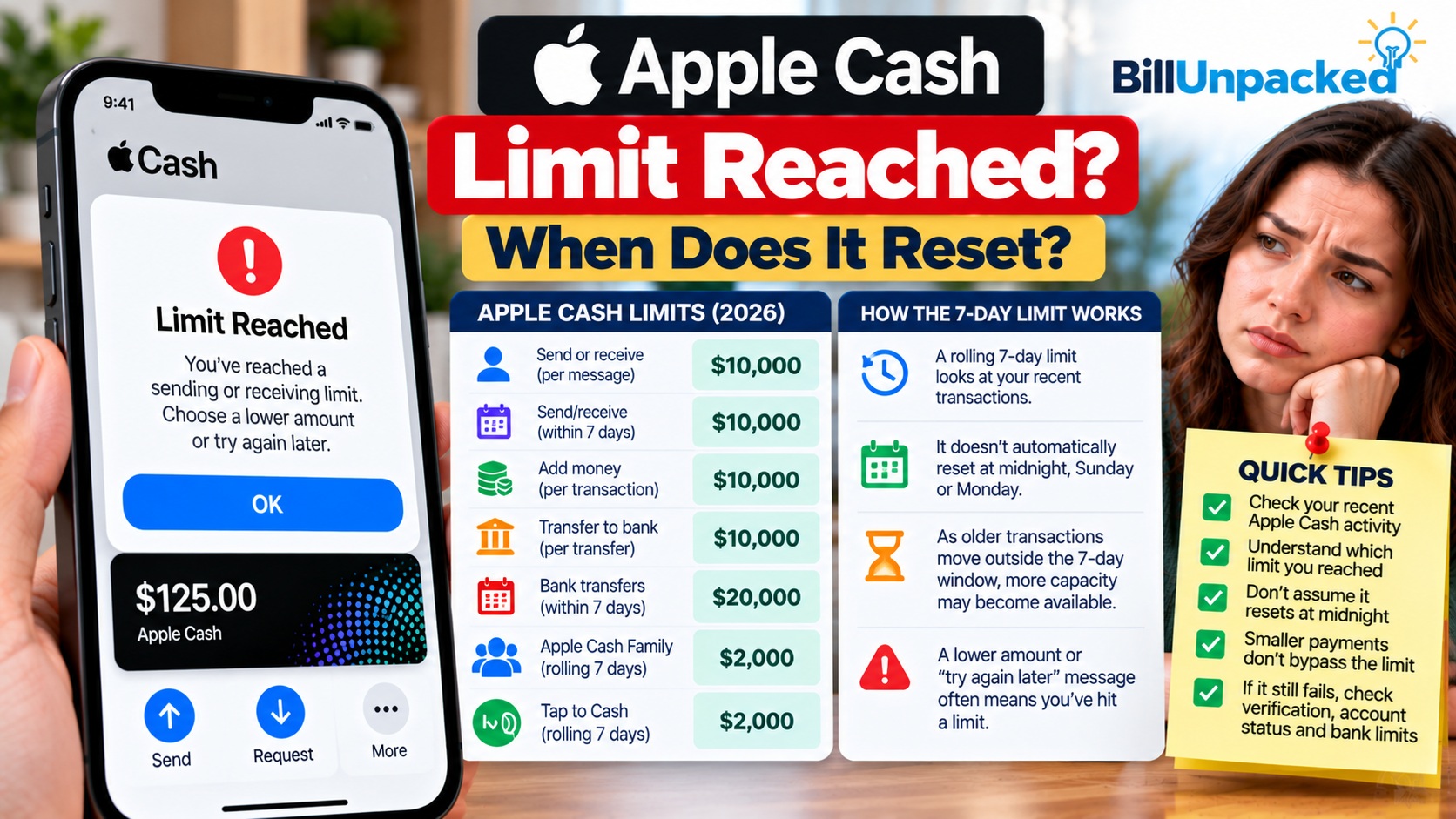
Apple Cash Limit Reached? When Does It Reset?
What Does “Apple Cash Limit Reached” Mean?
An Apple Cash limit message generally means the transaction you’re attempting has run into one of the limits applicable to your account or transaction type.
Apple’s own troubleshooting instructions say that if you’re asked to choose a lower amount or try again later, you might have encountered a sending or receiving limit.
This can happen even when the single transaction you’re attempting looks smaller than Apple’s maximum per-message amount.
Why? Because Apple Cash also has limits covering transactions made within a 7-day period.
When Does the Apple Cash Limit Reset?
There isn’t a single published reset time that applies to every Apple Cash limit.
In particular, you should not assume that your limit automatically becomes available:
- At midnight tonight
- Every Sunday
- Every Monday
- At the start of a calendar week
- At the beginning of a new month
Apple specifically describes Apple Cash Family and Tap to Cash limits as applying within a rolling seven-day period.
For standard Apple Cash limits, Apple states maximum amounts within a 7-day period. Because Apple does not publish a single universal clock-reset rule on its limits page, check your actual transaction history rather than relying on a particular weekday.
What Are the Current Apple Cash Limits?
| Activity | Current Published Limit |
|---|---|
| Send/receive per message | Maximum $10,000 |
| Send/receive | Maximum $10,000 within a 7-day period |
| Add money | Maximum $10,000 per transaction |
| Add money | Maximum $10,000 within a 7-day period |
| Transfer to bank/debit card | Maximum $10,000 per transfer |
| Transfer to bank/debit card | Maximum $20,000 within a 7-day period |
| Apple Cash balance after identity verification | Maximum $20,000 |
| Apple Cash Family send/receive | Maximum $2,000 within a rolling 7-day period |
| Tap to Cash send/receive | Maximum $2,000 within a rolling 7-day period |
Why Did I Reach the Limit Below $10,000?
The $10,000 maximum per message does not mean you can always send another $10,000 transaction.
Your previous activity during the applicable 7-day period also matters.
Your bank or card issuer can also have its own limits when a debit or prepaid card is involved.
How Do I Check My Recent Apple Cash Transactions?
Before repeatedly trying the payment, review your Apple Cash activity.
This is more useful than assuming every Apple Cash limit resets at the same time.
Does the Limit Reset Exactly 7 Days After a Payment?
For limits Apple explicitly identifies as rolling seven-day limits, transactions are considered over a moving period rather than a fixed Sunday-to-Saturday calendar week.
That means different portions of your available limit can become available as older qualifying transactions fall outside that window.
Does the Apple Cash Limit Reset at Midnight?
Apple’s current support documentation does not establish a universal midnight reset for Apple Cash limits.
Waiting until midnight therefore does not guarantee that a payment blocked by a 7-day limit will suddenly work.
Review when your earlier transactions occurred and try again after enough of the applicable transaction activity has moved outside the relevant limit period.
Does Apple Cash Reset Every Sunday or Monday?
Apple does not publish a rule saying all Apple Cash limits reset every Sunday or every Monday.
This distinction matters because a fixed calendar week and a rolling 7-day period are not the same thing.
If you reached a limit after several transactions, simply reaching Monday may not restore the full amount.
What Is the Apple Cash Sending Limit?
Apple currently publishes the following standard sending and receiving limits:
- Minimum: $1 per message
- Maximum: $10,000 per message
- Maximum: $10,000 within a 7-day period
These limits cover sending and receiving person-to-person payments.
Apple also warns that your available balance, debit/prepaid card balance, bank or card issuer may impose additional constraints.
What If I Reached the Apple Cash Bank Transfer Limit?
Moving Apple Cash to a bank account or eligible debit card has a different 7-day maximum.
| Transfer Rule | Limit |
|---|---|
| Minimum transfer | $1, or full balance when balance is under $1 |
| Maximum single transfer | $10,000 |
| Maximum within 7 days | $20,000 |
If you’ve already transferred close to $20,000 during the applicable 7-day period, attempting another transfer can fail even when the new transfer is less than $10,000.
How Long Does an Apple Cash Bank Transfer Take?
Apple provides two primary ways to move Apple Cash out of your account.
| Method | Typical Timing | Apple Cash Fee |
|---|---|---|
| Bank transfer | 1–3 business days | No fee |
| Instant Transfer | Typically immediate; can take up to 30 minutes | 1.7%, minimum $0.25 and maximum $25 |
Security checks can sometimes require additional time.
What If Apple Says “Try Again Later”?
Apple specifically advises that being asked to choose a lower amount or try again later can indicate that you encountered a transaction limit.
Use this sequence:
First determine whether the problem is actually a limit.
Look for transactions that could count toward the applicable 7-day limit.
Apple says identity verification may be necessary to access all Apple Cash features.
An account restriction is different from reaching a transaction limit.
For person-to-person payments, make sure the recipient is eligible to receive Apple Cash.
If Apple specifically says a debit-card-funded payment was declined by your bank, Apple recommends contacting your bank or card issuer.
Can I Send a Smaller Amount?
Possibly, but only if you still have unused capacity under the applicable limit.
For example, if only part of your 7-day allowance remains available, a smaller payment might fit within that limit.
However, splitting one payment into multiple smaller payments does not create additional 7-day capacity.
What If Apple Cash Is Restricted or Locked?
A restricted or locked Apple Cash account should not be confused with a normal transaction-limit message.
Apple recommends checking whether your account is restricted or locked when you cannot send or receive money.
You may also need to verify your identity.
If the problem continues after checking the applicable limits, contact an Apple Cash Specialist at Green Dot Bank through Apple’s official support process.
Can Green Dot Bank Give Me a Lower Limit?
Yes.
Apple states that Green Dot Bank may:
- Lower applicable limits
- Impose additional limits
- Cancel a transaction
- Delay a transaction
- Block a transaction
These actions can occur for security reasons or under the Apple Cash Terms and Conditions.
What Is the Apple Cash Family Limit?
Apple Cash Family accounts have substantially lower limits than standard verified adult accounts.
| Apple Cash Family Activity | Limit |
|---|---|
| Send/receive per message | Maximum $2,000 |
| Send/receive | Maximum $2,000 within a rolling 7-day period |
| Transfer to bank/debit card | Maximum $2,000 per transfer |
| Bank/debit transfers | Maximum $4,000 within 7 days |
| Maximum Apple Cash Family balance | $4,000 |
What Is the Tap to Cash Limit?
Tap to Cash has its own lower limit.
Apple currently says Tap to Cash can be used to send or receive up to $2,000 within a rolling seven-day period.
Therefore, hitting a $2,000 Tap to Cash limit does not mean your standard Apple Cash account suddenly has a $2,000 overall limit.
Apple Cash Limit vs. Apple Pay Limit
Don’t confuse Apple Cash transaction limits with an ordinary purchase made using Apple Pay.
| Service | Purpose |
|---|---|
| Apple Cash | Hold, send, receive and transfer money for eligible U.S. users. |
| Apple Pay | Use eligible payment cards stored in Wallet to make purchases. |
The Apple Cash limits discussed in this guide should not be presented as universal Apple Pay card-purchase limits.
What Should I Do If My Limit Still Hasn’t Reset?
If enough time appears to have passed but Apple Cash still won’t allow the transaction, don’t assume the problem is the same limit.
Check these items:
- Recent Apple Cash transactions
- Your current Apple Cash balance
- Identity-verification requirements
- Whether Apple Cash is restricted or locked
- Recipient eligibility
- Your bank or card issuer’s limits
- Whether the debit card is eligible for Instant Transfer
If those checks don’t resolve the problem, use Apple’s official support channel to contact an Apple Cash Specialist at Green Dot Bank.
Quick Answers
| Question | Answer |
|---|---|
| When does the Apple Cash limit reset? | There is no single published universal reset time. Several limits apply over 7-day periods, with Apple Cash Family and Tap to Cash explicitly using rolling seven-day periods. |
| Does Apple Cash reset at midnight? | Apple does not publish a universal midnight reset rule. |
| Does Apple Cash reset every Monday? | No universal Monday reset is published by Apple. |
| How much Apple Cash can I send? | Standard eligible accounts can send up to $10,000 per message, subject to the applicable $10,000 7-day sending/receiving limit. |
| What is the bank transfer limit? | Up to $10,000 per transfer and $20,000 within a 7-day period. |
| Why am I blocked below $10,000? | Your previous transactions, account status, security checks or bank/card issuer limits may also affect the transaction. |
| Can I just send several smaller payments? | Smaller payments do not bypass the applicable cumulative 7-day maximum. |
| Who provides Apple Cash? | Apple Cash services are provided by Green Dot Bank, Member FDIC, with Apple Payments Services LLC acting as a service provider. |
Bottom Line
If you’ve reached an Apple Cash limit, don’t wait for a supposed universal midnight, Sunday or Monday reset.
Apple applies different limits depending on what you’re doing. Standard person-to-person sending and receiving is limited to $10,000 within a 7-day period, while transfers to a bank account or eligible debit card can reach $20,000 within a 7-day period.
Apple Cash Family and Tap to Cash explicitly use rolling seven-day limits.
Review your recent activity, identify the exact limit you encountered and wait for applicable older transactions to move beyond the relevant period. If the transaction still fails, check identity verification, account restrictions, recipient eligibility and bank/card issuer limits.
Official Sources
Apple Support — Apple Cash Transfer Limits
Current Apple Cash sending, receiving, balance and transfer limits
Apple Support — Can’t Send or Receive Money With Apple Cash
Apple’s troubleshooting guidance for limit and payment problems
Apple Support — Transfer Apple Cash to a Bank or Debit Card
Bank transfer and Instant Transfer instructions
Last checked: October 4, 2026. BillUnpacked is not affiliated with Apple or Green Dot Bank. Apple Cash limits and eligibility can change, and Green Dot Bank may impose additional or lower limits or delay or block transactions for security reasons. Check Apple’s official support information before making a time-sensitive or high-value transfer.